
Ten ways to increase MySQL query speed and decrease running speed
This is the second article in the MySQL optimization series. In this article, I’m going to cover how to speed up select speed , improve query performance and improve MySQL performance.
Some of the concepts here will be similar to the ones in the previous article, so we will summarize them and not go over them again, our main focus is to improve performance of MySQL select query.
This article covers only optimizing InnoDB which is a MySQL storage engine. Although some of the suggestions here will work for MyISAM, this article assumes InnoDB usage for the mysql query speed tips. (And also for MariaDB and Percona server for MySQL which is a database we use often)
Server and hardware selection for MySQL server database
Table of Contents
Look at this section in our previous article (Buy a fast server Look at items four through six); a fast summary is that you shouldn’t use mechanical hard drives, and a dedicated server is faster than a cloud instance.
Measuring MySQL query performance

Measuring MySQL performance was also covered in the previous article. Another option is to see the time reported by MySQL to perform each query (BTW SQL stands for Standard Query Language, in case it wasn’t clear by now), but you need to ensure that the results were not served from the query cache.
Another possible caching related “issue” that may affect the measurement is OS cache. If there’s enough memory, it can cache MySQL raw files and skew the measurement.
Create an index
An index is the heart of every SQL based relational database, create the right one, and performance will be good.
If you are a MySQL professional, you can skip this part, as you are probably aware of what an Index is and how it is used.
Select and full table scan (slow slow slow)
To understand why indexes are needed, we need to know how MySQL gets the data.
Let’s say we have a simple table schema:
CREATE TABLE People (
Name VARCHAR(64),
Age int(3)
)
We want to get the age of John, so we make a simple selection:
Select Age from People where Name='John'
That would work great as long as we have a small amount of data, but the MySQL query speed will decrease when our table grows.
The reason is that MySQL will need to scan every row in the table and compare Name to ‘John.’ It will only exit once it found it, or it didn’t find anything.
Checking every row in the table is called a full table scan, which has zero performance. Think of a table with 1,000,000,000 rows (we have some of those in our data store), and every MySQL query will have to scan the entirety of the data. That would be crazy slow.
For example, we have a table with 300 million keywords. For debugging purposes, we need to do a full table scan once in a while. It takes about 5 minutes to get our data.
What is MySQL index?

Indexes allow for fast retrieval of data. Just like the index in a phone book (if you remember those), you’d search the Name, and it will point you to the page where that Name is.
There are several types of indexes in MySQL, and each has its use case and performance. It’s essential to choose the right one for what we need.
MySQL index types:
What is a Primary key?
Every table should have a primary key (unless you know what you are doing). The primary key can span multiple columns, which guarantees that the data is unique.
So in our example, if we put a primary key on the column Name, we can only have one name ‘John,’ but we can also have ‘Beth’ and ‘Karen.’
The advantage of a primary key is that MySQL sorts the data in a way that matches the key, and it’s the fastest key in terms of select performance.
What is a Spatial index?
This index is meant for geometric values, and it’s used for map and GIS-related purposes. I have never worked in that area and never used that index.
What is a Unique index?
This index is just like the primary key in that it guarantees that the columns that are part of the index will be unique, but unlike the primary key, managing this index takes space and memory.
For large indexes, you may need a big enough memory to handle any operations. I once used a 16GB instance, and the index had 200m rows; MySQL crashed when I tried to do a copy from one table to another.
What is a Regular index?
The regular index allows for multiple values with the same value; it’s managed just like the unique index.
What is a Full text index?
This index allows us to index substrings inside a string column. This is useful for wildcard string searches.
What is a Descending indexes?
These are regular indexes, but their sort order is reversed. This is supported by MySQL 8 (which you should use anyway) and is useful to process new data first.
Should I use an index on one or more rows?
It’s possible to put an index or a primary key on more than one rows. Doing so allows us to use the same index if we plan to put many rows in the where clause.
If we do put a separate index for each row, MySQL execution plan will find all the results from each where clause and then find only the ones that match all indexes.
Finding all the results and then merging them means a massive waste of resources! Using the same index on multiple rows, MySQL execution plan will find only the results from the first row, and then it will filter just those results using the second row where clause. And so on for more rows.
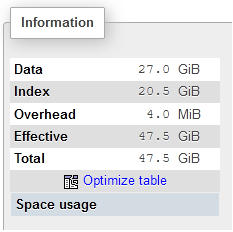
The drawback of an index over more than one row is the index size, sometimes an index can get quite big, as can be seen in the picture below (taken using phpmyadmin)
MySQL database table schema DDL
In the next paragraphs, we are going to discuss a table schema, so here it is:
CREATE TABLE Search (
SearchID BigInt,
Keyword Varchar(64)
PRIMARY KEY (SearchID)
INDEX idxKeyword (Keyword)
)
Our test table is populated with 300 million records. (DDL stands for Data definition language)
Checking how your selects are behaving

Adding indexes and primary keys doesn’t mean that MySQL will use them, MySQL has its own logic of how to use indexes for a given query. For queries that are slow or are running many times, it’s a good practice to check what happens under the hood.
The way you do it is with the command ‘explain.’ You put it before your SQL command, and MySQL lets you know the execution plans, which allows you to see how it affect the MySQL query speed.
The query execution plan
The main goal of a database is to store data and be able to retrieve it fast.
Before MySQL run a query, it needs to find the best execution plan for that query:
- Which index to use
- What order of index to use
- If using joins, which to do first
- Etc.
For the queries, we want to optimize we need to check the execution plan (also called Query Plan). The reason is that what we think is the right way may not be the right way for MySQL.
Furthermore, our indexes may not be usable for the query we are running.
Explain on a primary key
For example, let’s explain the following SQL statement:
explain SELECT * FROM `Search` where SearchID=1
SearchID is the primary key; the reply we get is:
+----+-------------+--------+------------+-------+---------------+---------+---------+-------+------+----------+-------+
| id | select_type | table  | partitions | type  | possible_keys | key     | key_len | ref   | rows | filtered | Extra |
+----+-------------+--------+------------+-------+---------------+---------+---------+-------+------+----------+-------+
|  1 | SIMPLE      | Search | NULL       | const | PRIMARY       | PRIMARY | 4       | const |    1 |100.00    | NULL  |
+----+-------------+--------+------------+-------+---------------+---------+---------+-------+------+----------+-------+
As we can see, MySQL uses the primary key to do the select and will only make use of one row.
Explain without primary key
Now let’s do a select on a row without a primary key:
explain SELECT * FROM `Search` as Search where Results=1;
The column results have no index or primary key, and the result is:
+----+-------------+--------+------------+------+---------------+------+---------+------+-----------+----------+-------------+
| id | select_type | table  | partitions | type | possible_keys | key  | key_len | ref  | rows      | filtered | Extra       |
+----+-------------+--------+------------+------+---------------+------+---------+------+-----------+----------+-------------+
|  1 | SIMPLE      | Search | NULL       | ALL  | NULL          | NULL | NULL    | NULL | 245410801 |    10.00 | Using where |
+----+-------------+--------+------------+------+---------------+------+---------+------+-----------+----------+-------------+
A full table scan would be very slow.
Explain for index
Our next process is to do a select on a row with an index:
explain SELECT * FROM `Search` as Search where Keyword='test';
And the result is:
+----+-------------+--------+------------+------+---------------+------------+---------+-------+-------+----------+-------+
| id | select_type | table  | partitions | type | possible_keys | key        | key_len | ref   | rows  | filtered | Extra |
+----+-------------+--------+------------+------+---------------+------------+---------+-------+-------+----------+-------+
|  1 | SIMPLE      | Search | NULL       | ref  | IdxKeyword    | IdxKeyword | 12      | const | 49082 |   100.00 | NULL  |
+----+-------------+--------+------------+------+---------------+------------+---------+-------+-------+----------+-------+
MySQL will process 49082 rows, but let’s see how many rows we actually have:
SELECT count(*) FROM `Search` as Search where Keyword='test';
And the result is:
+----------+
| count(*) |
+----------+
|    26094 |
+----------+
There are fewer rows than what the explanation showed. This can be due to how MySQL manages indexes, but it’s still fast enough and not a full table scan.
Checking the where clause for the MySQL query
The where clause is one of the most crucial parts of every select query because that’s the purpose of a database: get specific data and fast.
This means that you need to make sure that the columns checked with the where clause are indexed or are small so that a scan will be fast.
MySQL index optimization for complex where clause
The ‘explain’ paragraph covers a few examples with an index in the where clause, but those were straightforward examples. Let’s show another example where we use both a primary key and an index:
explain select * from Search as Search where SearchID between 1 and 1000000 and Keyword between 'aaaaaaaaa' and 'bbbbbbbbb';
The result is:
+----+-------------+--------+------------+-------+--------------------+---------+---------+------+---------+----------+-------------+
| id | select_type | table  | partitions | type  | possible_keys      | key     | key_len | ref  | rows    | filtered | Extra       |
+----+-------------+--------+------------+-------+--------------------+---------+---------+------+---------+----------+-------------+
|  1 | SIMPLE      | Search | NULL       | range | PRIMARY,IdxKeyword | PRIMARY | 4       | NULL | 1052210 |    12.30 | Using where |
+----+-------------+--------+------------+-------+--------------------+---------+---------+------+---------+----------+-------------+
This is good; MySQL used both indexes.
No index selection with calculation on a column SQL example
Let’s try to mess it up:
explain select * from Search as Search where MOD(SearchID,2)=1;
In this example, we are doing a calculation on the column with the primary key; look what MySQL will do:
+----+-------------+--------+------------+------+---------------+------+---------+------+-----------+----------+-------------+
| id | select_type | table  | partitions | type | possible_keys | key  | key_len | ref  | rows      | filtered | Extra       |
+----+-------------+--------+------------+------+---------------+------+---------+------+-----------+----------+-------------+
|  1 | SIMPLE      | Search | NULL       | ALL  | NULL          | NULL | NULL    | NULL | 245412211 |   100.00 | Using where |
+----+-------------+--------+------------+------+---------------+------+---------+------+-----------+----------+-------------+
It performed a full table scan, even though we have a primary key! The way to solve it is to add a precalculated field, index it, and use that index field in the where clause.
The wrong type of index
Let’s do a wildcard select on an indexed column:
explain select * from Search as Search where Keyword like '%a%';
We are searching for any keyword that has the letter ‘a’ inside, and MySQL does this:
+----+-------------+--------+------------+------+---------------+------+---------+------+-----------+----------+-------------+
| id | select_type | table  | partitions | type | possible_keys | key  | key_len | ref  | rows      | filtered | Extra       |
+----+-------------+--------+------------+------+---------------+------+---------+------+-----------+----------+-------------+
|  1 | SIMPLE      | Search | NULL       | ALL  | NULL          | NULL | NULL    | NULL | 245412257 |    11.11 | Using where |
+----+-------------+--------+------------+------+---------------+------+---------+------+-----------+----------+-------------+
For a full table scan, in this case, we need to add a full-text index to the column ‘Keyword.’
Optimize order by and index column selection

Here we do an order by using our primary key, which is in the where clause as well:
explain select * from Search where SearchID between 0 and 1000000 order by SearchID
The result is:
+----+-------------+--------+------------+-------+---------------+---------+---------+------+---------+----------+-------------+
| id | select_type | table  | partitions | type  | possible_keys | key     | key_len | ref  | rows    | filtered | Extra       |
+----+-------------+--------+------------+-------+---------------+---------+---------+------+---------+----------+-------------+
|  1 | SIMPLE      | search | NULL       | range | PRIMARY       | PRIMARY | 4       | NULL | 1052210 |   100.00 | Using where |
+----+-------------+--------+------------+-------+---------------+---------+---------+------+---------+----------+-------------+
Which means MySQL used the primary key, now let’s use the index as the sort factor:
explain select * from Search where SearchID between 0 and 1000000 order by Keyword;
This time we have a little surprise:
+----+-------------+--------+------------+-------+---------------+---------+---------+------+---------+----------+-----------------------------+
| id | select_type | table  | partitions | type  | possible_keys | key     | key_len | ref  | rows    | filtered | Extra
|
+----+-------------+--------+------------+-------+---------------+---------+---------+------+---------+----------+-----------------------------+
|  1 | SIMPLE      | search | NULL       | range | PRIMARY       | PRIMARY | 4       | NULL | 1052210 |   100.00 | Using where; Using filesort |
+----+-------------+--------+------------+-------+---------------+---------+---------+------+---------+----------+-----------------------------+
MySQL didn’t use our index; it sorted the data manually, which will slow down our MySQL query speed.
No index on table join queries
When doing a join between one or more tables (all type of joins: inner join, left join, right join, etc.), make sure that the join column you join on is indexed. Otherwise, MySQL will need to do a full table scan to do a proper join.
How can you know if this is the case? Use EXPLAIN. You should be an expert on using it by now. 😊
High MySQL performance configuration
MySQL out of the box configuration is modest and designed to support operations for web sites like WordPress.
To achieve the performance you’d expect from a modern database, you will need to tweak and tune the default configuration.
The settings reside in the file my.cnf. In case of centos, it’s under /etc/my.cnf
Tuning tips for your MySQL database
innodb_buffer_pool_size
Personally, I believe this is the most critical MySQL setting, and it sets the amount of memory MySQL uses to cache table and index data. The settings should be 75% of memory because the size is not set in stone, and MySQL may be allocated 10% more of the set size.
Also, you may have other applications running, so you need to reserve memory for them.
I helped a friend (the same one I wrote about), and the first thing I checked even before the table structure is the memory allocated to MySQL. It was on default, which was 2GB on his machine. Changing it to 48GB increased performance drastically.
innodb-buffer-pool-instances
The number of instances the buffer pool is divided into, this is to allow for better concurrency with threads. It’s only relevant if the buffer pool is over 1.3GB.
On Windows 32bit, the default is the buffer pool size divided by 128MB. On all other systems, the default is 8.
With the new AMD processors, you can have 64 or 128 cores, and you can experiment with this value to see if you get better performance.
join_buffer_size
This setting tells MySQL how much memory to allocate to the join buffer, which is used while creating joins.
If the join data is too large, MySQL will resort to using a temporary table on the hard drive.
The default value is 256KB; keep in mind that increasing this value will increase the value for every MySQL thread.
This value is also relatively small because joins should be small, so before raising this value, check if the design is correct, and maybe a design change is a better option.
Another option is to “hint” the optimizer before a query with a large join.
You can read on this setting in MySQL technical documentation: https://dev.mysql.com/doc/refman/8.0/en/server-system-variables.html#sysvar_join_buffer_size
MySQL table optimization
MySQL tables degrade after inserting data to them, that’s why there’s an option to optimize the table, the syntax is:
Optimize table tablename;
Usually, MySQL will create a new table, insert all the data to the new table and rebuild the indexes when it’s done.
Table optimization is time-consuming, and you need to make sure you have enough space on the server for the temp table. On more than one occasion, I got a database corruption after not having enough space. After the table is optimized, you should expect a better MySQL query speed and MySQL insert speed.
If you don’t insert data after the table optimization, there’s no need to optimize it again.
Query optimization with hints
Since we know best how we want to access our data, we can customize our query with optimizing hints.
There are many hints, and it’s not possible to cover all, you can view all of them here: https://dev.mysql.com/doc/refman/8.0/en/optimizer-hints.html
This document covers the hints we used and have experience with
Statement Execution Time Optimizer Hints
Statement Execution Time Optimizer Hints allows us to limit the execution time of a query. Limiting execution time is essential because some queries are just too long.
For example, in our production server is when merging the number of indexes, and the result returns a million rows or more.
Under certain conditions, those queries can be too long, and we rather terminate them, the way to do it is:
SELECT /*+ MAX_EXECUTION_TIME(1000) */ * from table
1000 is milliseconds so that it will allow for a maximum of one second.
Variable-Setting Hint Syntax
We may want to use a different value for MySQL global variable, for example, we may want to have a larger sort buffer just for a specific query, we can do it like this:
SELECT /*+ SET_VAR(sort_buffer_size = 16M) */ * from table
SQL_CALC_FOUND_ROWS
This flag tells MySQL that we want to know the number of results returned by the query, this saves us time to perform two queries, one for count(*) and for the actual data (and thus speed up MySQL database query). I wished I knew it a year ago.
An example would be:
Select SQL_CALC_FOUND_ROWS * from table
Then to get the value you can execute:
Select FOUND_ROWS()
To get the data. The value returned will reflect the total data available regardless if limit was used.
OLTP vs OLAP
There are two design paradigms for database design:
- OLTP – Online transaction processing
- OLAP – Online analytical processing
What is OLTP
OLTP is a design with the goal to provide both insert and select speed and reliability, a classic usage would be managing the data of the current year in a bank:
- Clients can see their transactions.
- Bank can insert new records.
- Bank can delete or modify existing records.
Some of the design concept used in OLTP:
- Data normalization – Breaking data into smaller tables allows for smaller data storage and to perform fewer inserts. When querying the data, one or more joins are used.
- Transactions – This allows for rollbacks in case there’s an issue and keep various actions as one atomic unit.
- Keeping referential integrity by using primary key/foreign key combination allows guarding against insert/delete errors of the data.
What is OLAP
OLAP is a design with the goal to provide only select operations, and there are no delete/update/insert operations. A classic usage would be to manage the data of a year that have passed in the bank:
- Clients can see their records.
- Records can’t be changed anymore. Data is read only.
Some of the design concepts of OLAP:
- Data is not normalized but is saved in a blob as a single long line.
- Not a design concept, but to save costs, data will most likely be saved on mechanical hard drives, which means the design must be fast for select operations.
- The database contains summary tables, to save time, statistics and other information is calculated during off-hours and stored to fast retrieval.
Which to choose?
The right design can make or break the database. It’s also possible that data will have two life cycles. The first cycle is OLTP, and when it can’t be changed anymore, switch to OLAP.
The selection criteria is:
- Is the data read-only? Consider using OLAP.
- Is the data read and write? Use OLAP.
- Can the data be partitioned into both read only and read and write? Divide your data into an OLTP and OLAP store.
Even more ways to optimize MySQL queries
We created a second part of this guide with even more tips and ways to optimize your MySQL database, you can read it here: Even more ways to increase MySQL query speed and decrease running speed (part 2)
Summary
In this guide we started to cover some aspects of how to optimize MySQL query speed and performance, in the next guide we will cover more topic like Table optimization, memory settings and more.
Thanks for a great article, I didn’t even know about the memory settings in my.cnf. Btw, foreign keys automatically have indexes created on them (at least for mysql 5.7).